
User's Manual



29
EXIT
Press the exit button on the handset to end an operation, such as
TRANSFER or exit the program mable menu.
PAGING
This feature helps you locate a m isplaced handset. All handsets m ust be
registered to use the page function. If your handsets are not registered,
follow the instructions in the Handset Registration section of this manual.
HANDSET AND HANDSET PAGING
NOTE: For model 25825, you must register an additional handset (model
25802) in order to use this feature.
Make sure the phone is OFF (not in talk mode).
1. Press the int/conf button on the handset.
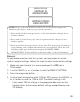
2. Use the touch-tone pad on your handset to enter the handset num ber you
want to page when
PA GING EXTENSION?
shows in the display. The
paged handset beeps for 2 m inutes.
3. To cancel the page, press the * exit button, or press the int/conf button.
PAGING FROM BASE/GROUP PAGING
1. Press the page button on the base. All registered handsets (or the
single handset on model 25825) beep for 2 minutes and “
PA GING
FROM BASE
” shows on each handset’s display.
2. To cancel the page, press the page button on the base again, or press
the talk/callback button on each handset.
NOTE: Handsets are n umbered from 1 to 4.
PAGING
EXTENSION ?