
User's Manual



26
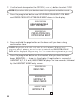
• If you select
NO
, your program med setting are retained.
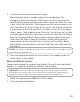
5. Press the prog/select button to save. The confirm ation screen displays
then returns to the m ain m enu. You will hear a confirm ation tone.
TELEPHONE BASICS
RINGER SETTING SHORTCUT
NOTE : In addition to setting the ringer level th rough the programmable
menu, you may also set it with the sh ortcut key.
1. Make sure the phone is OFF (not in TALK mode).
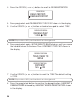
2. Press the #PAUSE button, and
SET RINGER 1ON 2OFF
shows on
the display.
3. Press 1 to turn the ringer ON and 2 to turn it OFF. You w ill hear a
confirm ation tone, and the display returns to standby.
HANDSET SPEAKERPHONE
For hands-free operation and convenience, your multi-handset system is
equipped w ith a handset speakerphone.
For best handset speakerphone performance, avoid the following:
• Areas w ith high background noise. (The microphone m ight pick up
these sounds.)
• Surfaces affected by vibration.
•Recessed areas such as in a corner, under a cupboard, or next to a
cabinet, which can generate an echo effect.
Note the following guidelines w hen using the speakerphone:
• Stay reasonably close to the phone so that you can be clearly heard by
the person to whom you are talking.
CHARGE/IN USE INDICATOR
When the charge/in use indicator on the base is lit, the handset is correctly
seated in the cradle and is charging. The indicator flashes, when the base
pages the handset, or when you receive an incoming call.