
User's Manual



23
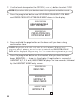
5. Use the touch-tone pad to enter the name.
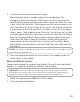
More than one letter is stored in each of the num ber keys. For
example, to enter the nam e Bill Smith, press the 2 key twice for the
letter B. Briefly pause and the cursor m oves to the next field. Press the
4 key 3 tim es for the letter I. Briefly pause and the cursor moves to the
next field. Press the 5 key 3 tim es for the letter L. Briefly pause and the
cursor moves to the next field. Press the 5 key 3 tim es for the second
letter L, press 1 key to add a space. Press the 7 key 4 tim es for the letter
S. Briefly pause and the cursor m oves to the next field. Press the 6 key
once for the letter M . Briefly pause and the cursor m oves to the next
field. Press the 4 key 3 tim es for the letter I. Briefly pause and the
cursor moves to the next field. Press the 8 key for the letter T. Briefly
pause and the cursor moves to the next field. Press the 4 key tw ice for
the letter H.
NOTE: If you make a mistake press th e delete/ redial button to backspace and
erase the wron g character( s).
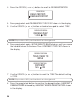
5. Press the prog/select button to save, and exit the standby mode, the
name shows in the display.
HANDSET DEREGISTRATION
Deregistration cancels a handset’s registration. During the de-registration
process, it’s important to keep the handset near the base.
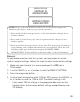
WARNING: It is not recommended th at a handset be de-registered un less
absolutely n ecessary because once a handset is deregistered, th at handset’s
teleph on e features cannot be used until the h andset is re-registered.
1. Make sure your phone is OFF (not in TALK mode).
2. Press the prog/select button.