
User's Manual



22
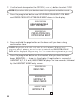
2. Use the touch-tone pad or the CID/VOL ( or ) button to select
1YES
.
NOTE: If you select 2NO, your h andset cannot be registered and will n ot work.
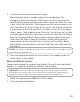
3. Press the prog/select button and
HOLD BASE PAGE WAIT FOR BEEP
and
PRESS PROG KEY AFTER BASE BEEP
shows in the display.
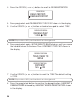
3. Press and hold the page button on the base until you hear a long
confirm ation tone.
NOTE: Registration should on ly take about 1 min ute. If there is no
respon se after 1 min ute, an error ton e is emitted and REGISTRATION
FAIL will be displayed. Repeat step 1 to 3 to restart the registration process.
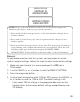
4. Press the prog/select button on the handset after you hear the base
beep.
REGISTER......
. show s in the display. If registration is successful,
HANDSET # (1, 2, 3 or 4) REGISTERED
displays for tw o seconds, followed
by the HANDSET NAM E
entry screen.
HOLD BASE PAGE
WAIT FOR BEEP
REGISTRATION
PRESS PROG KEY
AFTER BASE BEEP
REGISTRATION
HANDSET #
HANDSET NAME
REGISTER...
REGISTRATION
HANDSET #
REGISTRATION
REGISTERED