
User's Manual



21
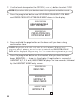
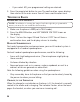
4. Press prog/select button.
5. Default is
#123
. Enter “
#
” and any other 3 digits.
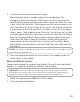
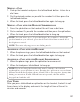
6. Press prog/select button to confirm. The confirm ation screen show s for
two seconds, and then returns to the main menu. You will hear a
confirm ation tone.
HANDSET REGISTRATION
READ THIS NOTE: Your h andset(s) is pre-registered and ready to use.
Registered handsets display HANDSET 1, HANDSET 2, and HANDSET 3. It is
not recommen ded or n ecessary to re-register th e h andset. If you purch ased an
extra handset separately ( model 25802) , follow th is procedure to register th e
extra handset. On e base can support up to four handsets.
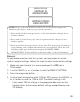
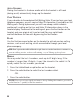
During the registration process, keep your handset near the base. When
your handset shows the follow ing:
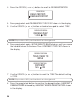
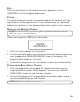
1. Press the prog/select button.
SET CODE
# - - -
SECURITY CODE
# 258
SECURITY CODE
HANDSET NEEDS
REGISTRATION
REGISTER?
1 YES 2 NO
REGISTRATION
123