
User's Manual





19
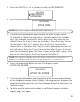
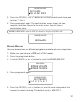
6. A total of 10 VIP can be stored. Press prog/select button to select the
VIP memory location. The
SELECT MEM ORY
screen displays for 2
seconds, and then displays the m emory records.
7. Press the CID/VOL ( or ) button to scroll to your desired mem ory record.
8. Press prog/select button to confirm the selection.
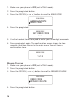
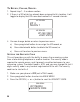
SET MELODY
screen displays.
9. Press the CID/VOL ( or ) button or the touch tone pad to select the
desired ringer melody. The melodies ring accordingly.
10.Press prog/select select button to confirm your selection. The
confirm ation screen displays for tw o seconds and returns to the m ain
menu. You will hear a confirm ation tone.
JOHN SMITH
VIP MELODY
VIP1 -MELODY 7
SET MELODY
VIP MELODY
1 2 3 4 5 6 7
SELECT MEMORY
VIP MELODY
JOHN SMITH
VIP MELODY
317-123-4567
VIP 1
* EMPTY *
VIP MELODY