
User's Manual





17
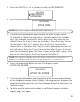
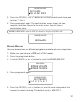
5. Press the CID/VOL ( or ) button or use the handset touch-tone pad
to enter 1, 2 or 3.
6. Press prog/select again. The confirm ation screen show s for two
seconds, and then returns to the main menu. You w ill hear a
confirm ation tone.
NOTE: If RINGER is turned OFF, the handset displays RINGER OFF.
RINGER MELODY
You may choose from six different polyphonic melodies plus one ringer tone.
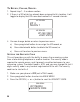
1. Make sure your phone is OFF (not in TALK mode).
2. Press the prog/select button.
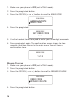
3. Use the CID/VOL ( or ) button to scroll to
RINGER M ELODY
.
4. Press prog/select again.
5. Press the CID/VOL ( or ) button, or use the touch tone pad on the
handset to select a m elody. The default value is
MELODY 1
.
SET LEVEL
1HI 2LOW 3OFF
RINGER VOLUME
LEVEL LOW
RINGER VOLUME
RINGER VOLUME
RINGER MELODY
MAIN MENU
SET MELODY
1 2 3 4 5 6 7
RINGER MELODY