
User's Manual





14
LANGUAGE
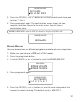
1. Make sure your handset is OFF (not in talk m ode).
2. Press the prog/select button w hile in standby mode to enter the
main menu.
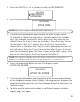
3. Press the CID/VOL ( or ) button to scroll to
LANGUAGE.
4. Press the prog/select button.
5. Use touch-tone pad to select
1ENG, 2FRA , 3ESP,
or use the CID/VOL (
or ) button to scroll to
1ENG, 2FRA, or 3ESP. ENG
(English) is the
default setting.
6. Press the prog/select button to confirm . The confirm ation screen
displays if any changes are m ade and then returns to the m ain m enu.
HANDSET NAME
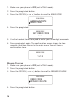
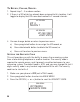
1. Make sure your phone is OFF (not in TALK mode).
2. Press prog/select button.
3. Press the CID/VOL ( or ) button to scroll to
HANDSET NAME M ENU
.
LANGUAGE
HANDSET NAME
MAIN MENU
SELECT LANGUAGE
1 ENG 2FRA 3ESP
LANGUAGE
LANGUAGE
HANDSET NAME
MAIN MENU
ENGLISH
LANGUAGE