
User's Manual





12
CID/VOL
call
back
talk spk
skiprew
play
stop
exit pause
erase
form at answer
f
la
sh
mute
prog
select
delete
redial
int
conf
mem ory
wxy z
9
mno
6
def
3
abc
2
jkl
5
tuv
8
pqrs
7
ghi
4
1
*
wxy z
0
#
WALL MOUNTING THE BASE
NOTE: For best results, leave the base on a flat sur face durin g initial chargin g
before you hang it on the wall.
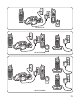
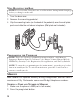
1. Turn the base over.
2. Rem ove the m ounting pedestal.
3. Slip the mounting holes (on the back of the pedestal) over the wall plate
posts and slide the unit down into place. (Wall plate not included.)
PROGRAMMING THE TELEPHONE
NOTE: There are eleven programmable menus available : Add Memory,
Language, Handset Name, Local Area Code, Ringer Volume, Rin ger Melody,
VIP Melody, Security Code, Registration, De-registration, and Factory Default.
NOTE: To enter th e programming mode ( main men u), press th e prog/ select
button in stan dby mode. To exit the main men u, press th e */ exit button to
return to stan dby mode.
MEMORY
Each handset has separate mem ory dialing storage areas, and can store a
maximum of fifty 15-character nam es and 24-digit telephone num bers.
STORING A NAME AND NUMBER IN MEMORY
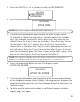
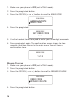
1. Make sure the phone is OFF (not in talk mode).
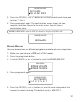
2. Press the prog/select button.