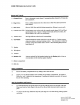
3-5800 FRS Radio Instruction Guide Buttons and Controls 1} Channel Button 2) Page Button 3) PTT Button 4) Channel 1,2. 3 LED 5} Transmit LED 6) On/Volume 7) Speaker 8) Microphone 9) Antenna 10) Headset Jack 11) Battery compartment 12) Belt clip Battery Installation Press to increment to next channel. Increment from channel 3 will return the unit to channel 1. Press to initiate transmission of an alert tone to other FRS radios tuned to the same channel, (Press-to-Talk) Press and hold during transmission.
.5800 FRS Radio Instruction Guide Using Your Family Radio bH ‘Turn on power. 2) Set to devised channel. 3 Adjust volume to a comfortable level. Transmitting a call: Press and hold the PTT bunion. The red transmit LED will light to indicate transmit mode. Speak ina lair, normal voice about 2-3 inches away from the microphone. To avoid cutting off the first part of your transmission, pause slightly after pressing the PTT button before you start taking. Release the PTT button then you are finished talking.
3-5800 FRS Radio Instruction Guide In accordance with FCC requirements, changes or modifications not expressly approved by Thomson Consumer Electronics could void the user's authority to operate this product. This device generates and uses radio frequency (RF) energy, and if not installed and used properly, this equipment may cause interference to radio and television reception.
3.5800 FRS Radio Instruction Guide + Products that have been modified or incorporated into other products. « Product purchased or serviced outside the USA. o Acts of God, such as but not limited to lightning damage. How does state law relate to this warranty? « This warranty gives you specific legal rights, and you may also have other rights which vary from state to state. What if you purchased your product outside of the United States? + This warranty does not apply.