
User's Manual
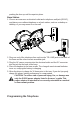
sending handset.
4. Wait for the person at the receiving handset to press the delete/intercom/conf button.
NOTE: If the receiving handset does not answer within two minutes, the intercom call is
automatically canceled. The originating handset displays NO ANSWER.
5. When finished, press the END/cancel button or delete/intercom/conf button on either handset to deactivate the
intercom.
NOTE: The system is expandable up to 8 handsets (by purchase of optional Model 28801 handset
with recharge cradle). When 4 handsets are registered, the system can handle 2 separate intercom
operations at once, for example, 1st handset intercoms with 2nd handset while 3rd handset
intercoms with 4th handset.
Receiving an Intercom Call
While you receive an intercom call, your handset beeps. To answer the call, press the delete/intercom/conf button
or TALK button.
Advanced Intercom Features
Receiving an Incoming call during an Intercom Call
If you receive a telephone call during an intercom call, the intercom call is immediately terminated and both
handsets ring. Either handset user may press the TALK or SPEAKER button to answer the call.
Using Intercom with External Telephone Calls
During a telephone call, you may use the intercom/paging function to page another handset and have an off line,
private (two-way) intercom conversation. You may also have a three-way conversation between the external
caller and the handsets, or you may transfer the external telephone call to another handset.
NOTE: Before you intercom/page another handset, you must decide whether you want to create a
two-way or a three-way conversation.
Two-Way Calling
1. During an external call, press the delete/intercom/conf button, and use the touch-tone pad to enter the handset
number you want to call.
NOTE: The receiving handset presses the delete/intercom/conf button to answer the intercom call.
Both intercom users may speak privately. The external caller will not hear the intercom conversation.
2. When finished, press the END/cancel button or delete/intercom/conf button to end the intercom call, return to
the talk mode, and resume your original telephone conversation.
Three-Way Calling
1. During an external call, press the delete/intercom/conf button. LINE ON HOLD EXTENSION? shows in the
display.
2. Use the touch-tone pad to select Handset #. You will hear a paging tone and PAGING shows in the originating
handset’s display.
NOTE: PAGING FROM... shows in the display on the receiving handset, and the receiving handset
presses the delete/intercom/conf or TALK button to answer the intercom.
3. When the receiving handset connects, press the delete/intercom/conf button on the originating handset to
conference with the receiving handset and the external caller. CONFERENCE shows in the display on the
originating and receiving handsets.
NOTE: A handset can enter conference mode directly by pressing TALK or SPEAKER on the
second handset during a call.
Transferring External Calls to Other Handsets
During an external call, you may transfer the external call to another handset.
1. Press the delete/intercom/conf button on the originating handset to put an external call on hold, and then page
the receiving handset.
2. Use the touch-tone pad on the handset to select Handset #. You will hear a paging tone. PAGING shows on
the originating handset’s display, and PAGING FROM... shows on the receiving handset’s display.