
User's Manual

15
Installing the Phone
Installing the Handset Battery
NOTE: You must connect the handset battery before use.
CAUTION: To reduce the risk of fire or personal injury, use only
the Thomson Inc. approved Model TBD Nickel-metal Hydride
battery (Ni-MH), which is compatible with this unit.
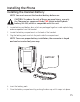
1. Locate battery and battery door which are packaged together inside a plastic bag
and are separate from the handset.
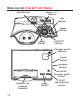
2. Locate the battery compartment on the back of the handset.
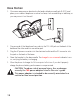
3. Plug the battery pack cord into the jack inside the compartment.
NOTE: To ensure proper battery installation, the connector is keyed
and can be inserted only one way.
BATTERY
BLACK WIRE
RED WIRE
4. Insert the battery pack.
5. Close the battery compartment by pushing the door up until it snaps into place.