
User's Manual


23
Web Conguration
Access and Change Gateway Advanced Settings
The Gateway offers local management capability through a built in HTTP
serverandanumberofdiagnosticandcongurationwebpages.Youcan
congurethesettingsbywayofthewebpageandapplythemtothedevice.
OnceyourhostPCisproperlycongured;pleaseproceedasfollows:
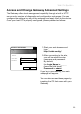
Start your web browser and 1.
type
http://cable.cong/
After connecting to the site, 2.
you will be asked to enter
username and password.
By default,
the Login Name is: ______
(leavetheeldblank)
Password is: admin
If you log in successfully, the main
webpage will appear.
You can also access these pages by
inserting the CD that came with your
Gateway.
Connect to 192.168.100.1
? X
Thomson
User name:
Password:
Remember my password
OK
Cancel