
User's Manual






43
Appendix - Customizing Your Handset
Handset ID
Register Handset
Select Base
De-Register
Registration
Ring Tone
Ring Tone
Ring Volume
Beep Tone
External Calls (
choice of 5 ringtones)
Internal Calls (choice of 6 ringtones)
Key Beep (on/off)
Low Battery (on/off)
Out of Range (on/off)
Notifications (on/off)
Alarm
Time Format
on/off
Set Alarm Tone
Time
Settings
System PIN
Ear Volume
Contrast
Backlight
Auto Talk
Handset Update
Handset Settings
Base Settings
Reset to Default
Phone
Settings
Additional Information
Customize Your Handset
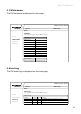
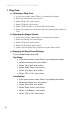
Chart of the Menus
While in the home screen press the menu softkey. Select the settings icon to
access the settings menu of the phone.
The menu structure is as follows:
CONFIRM - When working in the screens on your handset, there are two
ways to conrm your selections. In most screens you will use a softkey for
“OK”; but, if that is not available, use the “Select” key located in the center of
the navigation key.