
User's Manual



17
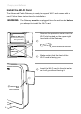
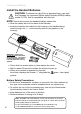
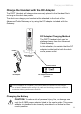
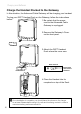
Activating Services
Setup Wireless Access for Your Laptop, PC or Other Device
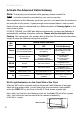
Wi-FionyouAdvancedCableGatewayispreconguredwithanetworkname
(SSID) and WPA key (a security password to prevent others access to your
wireless network). This information is printed on the label on the outside of
your Gateway as shown in the following diagram:
In order to take advantage of the Wi-Fi connection available to you with
the Gateway you will need to setup your computer. Setup will be different
depending on the year, brand, model and installed software of your
computer. Please follow the instructions received with you computer that
explain how to connect to a wireless network. If you are using a recent
version of Microsoft Windows, one of the following methods may apply
(consult your computer/laptop instructions if one of these methods does not
work)
Method 1:
Click on “Wireless” icon in the bottom right hand portion of your •
screen
Select,”View Wireless Networks”•
Highlight “SSID” from the list and press “Connect”•
When prompted, enter the WPA key twice and press “Connect”•
Method 2:
Go to “Start” - “Control Panel” - “Network Connections”•
Double click “Wireless Network Connections”•
Highlight “SSID” from the list and press “Connect”•
When prompted, enter the WPA key twice and press “Connect”•
Method 3:
Go to “Start” - “Network Connections”•
Double click “Wireless Network Connections”•
Highlight “SSID” from the list and press “Connect”•
When prompted, enter the WPA key twice and press “Connect”•
WPA
SSID
S/N 87003 - 8174B0018
E-MTA MAC@ 00D059E132E5
MODEL : ACG905--C
CM MAC@ 00D059E132E4
Rating: 120V AC, 60Hz, 0.5A
SSID: THOMSON-ACG-32E4
WPA key: ZZZZZZZZZZZZZ
HW version: 05
Made in China for THOMSON
FCC ID WBJ ACG905C001THFR
I.T.E.
17GM E198937