
User's Manual



14
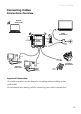
Connect Cables
computer (2)
computer (1)
wall
outlet
cable
connection
RF
RJ-45
RJ-45
Advanced
Cable
Gateway
Handset
Connect One or Two Computers with Ethernet Cables
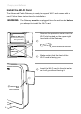
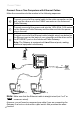
Make the connections to the modem in the following sequence:
Connect one end of the coaxial cable to the cable connection on the
wall, and the other end to the CABLE connector on the Advanced
Cable Gateway.
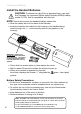
Connect one end of the power cord into the 120V, 60Hz, 0.5A socket
on the Advanced Cable Gateway and the other end into the power
plug in the wall.
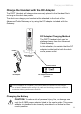
Connect one end of the Ethernet cable (straight-wired, see below) to
the Ethernet port on the back of your computer and the other end to
the ETHERNET port on the Advanced Cable Gateway.
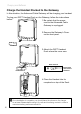
Note: The Gateway is equipped with two Ethernet ports, making
additional equipment unnecessary.
Note: Make sure that the Ethernet cable is straight-wired (not “null” or
crossover-wired).
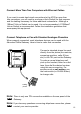
However, you will need a crossover-type cable if you are connecting the
Gateway to a hub or a hub within a port switch that provides the same
function.