
User's Manual






10
Charging and Batteries
Install the Handset Batteries
NOTE: You must connect the handset battery before use.
Attention - special care
should always be taken with
the loudspeaker - never allow
anything to poke through or
pour into the holes. It is very
delicate.
CAUTION
NOTE: The RBRC seal on the battery used in your Thomson Inc. product
indicates that we are participating in a program to collect and recycle the
rechargeable battery (or batteries).
For more information go to the RBRC web site at www.rbrc.org
or call 1-800-8-BATTERY or contact a local recycling center.
CAUTION:Toreducetheriskofreorpersonalinjury,useonly
the Thomson Inc. approved Nickel-metal Hydride (Ni-MH) battery
model 5-2734, that is compatible with this unit.
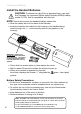
Slide the battery door off the back of the Handset.•
Insert the batteries • (included) into the housing in the Handset being
careful to align the + / - ends correctly (refer to the graphics in the
housing).
Check that the screen lights up, then replace the cover.•
Wait for about 30 seconds to allow the system to start up.•
When your handset is registered to its base, •
the screen displays the number “1” alongside the
(green - has signal)
symbol.
Battery Safety Precautions
Do not burn, disassemble, mutilate, or puncture. Like other batteries of •
this type, toxic materials could be released which can cause injury.
Toreducetheriskofreorpersonalinjury,useonlytheNickel-metal•
Hydride battery listed in the User’s Guide.
Keep batteries out of the reach of children.•
Remove batteries if storing over 30 days.•