
User's Manual





8
Charging and Batteries
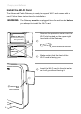
Install the Wi-Fi Card
The Advanced Cable Gateway is ready to support Wi-Fi and comes with a
card. Follow these instructions for installation:
Remove the protective cover over the
Wi-Fi slot located on the upper right
hand side of the Gateway.
Make certain that the front of the
Wi-Fi card is facing you.
Insert the Wi-Fi card in the slot as far
as it will go without forcing it.
Cover for Wi-Fi slot removed
WARNING: The Gateway must be unplugged from the wall socket before
you attempt to install the Wi-Fi card.
FRONT of WiFi card
(this side must face you
during insertion)
BACK
of WiFi card
Slot for Wi-Fi
with
cover removed