
User's Manual





7
Set-up
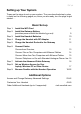
Setting up Your System
These are the steps to set up your system. They are described step by step
in detail on the following pages; so, when you are ready, turn the page to get
started. . .
Basic Set-up
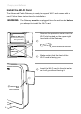
Step 1: Install the WiFi Card 8
Step 2: Install the Gateway Battery
(provides power should the electricity go out) 9
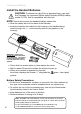
Step 3: Install the Handset Batteries 10
Step 4: Charge the Handset with DC Adapter 11
Step 5: Charge the Handset Docked to the Gateway 12
Step 6: Connect Cables
Connections Overview 13
Connect One or Two Computers with Ethernet Cables 14
Connect More than Two Computers with Ethernet Cables 15
Connect Telephone or Fax with Standard Analogue Phone Line 15
Step 7: Activate the Advanced Cable Gateway 16
Step 8: Set-up Wireless Access for Your
Laptop, Wireless PC or Other Device 17
Step 9: Become Familiar with the Handset Operation 18-22
Additional Options
Access and Change Gateway Advanced Settings 23-42
Customize Your Handset 43-49
Order Additional Handsets (up to 5 supported) visit www.tbd.com