
User's Manual






5
Parts and Putting them Together
Start
M
en
u
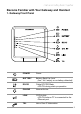
3. Handset Overview
Layout
Hands-Free Loudspeaker
Earpiece
Audio output for telephone calls.
Side Key
Use the up and down key of
the side button to increase or
decrease the listening volume
Left & Right Softkey
(described on page 18)
Color Ring
(outside perimeter of NavKey)
Displays differing color lights
as incoming calls & messages
are received
NavKey
(Navigation Key)
(described on page 18)
Talk Key (Green Key)
Press this key to get a dial tone.
After pre-dialing a number, press
to make a call.
Press to answer “call waiting”.
Press to activate the
Hands-Free function.
Keypad
These keys are used for dialing
phone numbers or entering text.
(
See additional description on page 19)
Microphone
Audio input for telephone calls
OFF (Red Key)
(described on page 18)