
User's Manual




40
Using the Handset
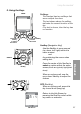
Back Mute
Call Volume
You can adjust the listening volume
from the earpiece or speakerphone
during a call.
While on a call, press UP or DOWN
of the NavKey to adjust the volume of
the earpiece.
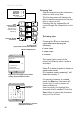
Mute
During a call, press the Mute softkey
to mute the microphone.
Press the UnMute softkey to resume
normal conversation.
For the Earpiece, press the UP Navkey to
raise volume
Press the DOWN Navkey to lower volume
Press the
Sidekey
UP or DOWN
to adjust the
Speakerphone
volume
Start
M
en
u
Note: The Mute function is used to silence the microphone during a
conversation. You will be able to hear the caller, but the caller will
not be able to hear you until you press the UnMute softkey to
resume the conversation. When you hang up the telephone, the
feature will be canceled.
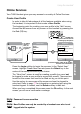
Note: After adjustment, a volume bar will appear on the screen. It will only
be displayed for three seconds and the volume level will be saved
automatically.
Unmute Back
To raise or lower the sound level of the
speakerphone, press the UP/DOWN
button on the Sidekey.