
User's Manual




39
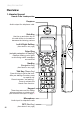
Handset
Using the Handset
Note: The speakerphone provides you a hands-free option while on a call.
During a call, press the green key to alternate between speakerphone
and normal handset use.
Note: The screen displays the elapsed time of the call (in hours, minutes
and seconds) and the telephone number you dialed while you are on
a call. After a call ends, the call summary will be displayed, showing
the length of the call in hours, minutes and seconds.
Day to Day Use
Making Calls
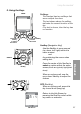
To make a standard telephone call,
press the green key (talk key) and then
dial the number. If you want to use
the speakerphone, press the green
key a second time and then dial the
number.
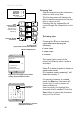
For pre-dialing, (preview numbers
before dialing)enterthenumbersrst.
If you make a mistake when dialing
use the NavKey (navigation key) to
place the cursor to the right of the
number you want to delete and press
the softkey remove to delete the
number. After entering the number,
press the green key.
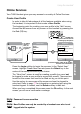
Receiving Calls
When the telephone is ringing, press
the green key to answer the call.
Press a the green key a second
time if you want to answer using the
speakerphone.
Green key
Press once:
regular call
Press twice:
speakerphone
Back Remove
555 5855
Next, press the corresponding
“remove” softkey
To edit, place
cursor to right
of number to
be removed
Press Red Key:
OFF
Ending Calls
While you are on a call, press the red
key (OFF key) to end the call.