
User's Manual


66
Using the Handset
Yellow Pages
This feature allows you to search yellow page listings.
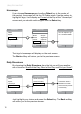
Highlight the Yellow pages
icon from “Idle” Screen or the “Menu”
screen.ConrmyourchoicebypressingtheSelect key in the middle
of the navkey.
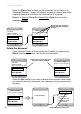
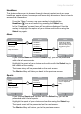
The “Yellow Pages - Location” screen allows you to enter the Street /
Intersection / Airport information (not required) and the City & State OR
ZIP code information. Use your navkey to move around the screen as
needed and the keypad to type the information. Press the Ok softkey
so that your search can move on the the next screen (“Local Search”
screen).
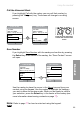
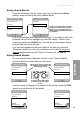
On this screen you can enter key words that will help you narrow
your search. Use the keypad again to enter keyword text into the box.
Highlight Go using the navkey; press the Selectkeytoconrmyour
choice. The screen that follows will list the search results.
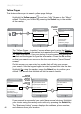
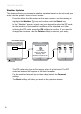
If your search is successful you could have several choices. Highlight
your choice using the navkeyandconrmbypressingtheSelect key.
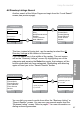
The “Business Listing” screen displays the address, phone number,
and distance from your location.
DeleteOptions
Local Search
Search for....
Pizza
Go
Or choose from....
Top Searches
All Directory Listings
Back Save
Business Listing
1537 West 86th St.
Evansville
(317) 100 1111
0.4 miles
Back
Search Results
[0.1] Noble Roman Pizza
[0.2] Nottingham Pizza Pies
[0.3] Unos Pizza
[0.4] Fresh Style Pizza
[0.5] Pizza a Go Go
Results
listed by the
distance
from your
location
- shortest
distance is
rst
DeleteOptions
Local Search
Search for....
Pizza
Go
Or choose from....
Top Searches
All Directory Listings
DeleteOptions
Local Search
Search for....
Pizza
Go
Or choose from....
Top Searches
All Directory Listings
DeleteOk
Full Address
Street / Intersection / Airport
optional
City & State OR ZIP
Login Menu
key word
to narrow
search