
User's Manual





27
Parts and Putting them Together
Assemble
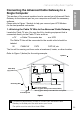
Connect one end of the coaxial cable to the cable connection on the
wall, and the other end to the CABLE connector on the Advanced
Cable Gateway.
Connect one end of the power cord into the 120V, 60Hz, 0.5A socket
on the Advanced Cable Gateway and the other end into the power
plug in the wall.
Connect one end of the Ethernet cable (straight-wired, see below) to
the Ethernet port on the back of your computer and the other end to
the ETHERNET port on the Advanced Cable Gateway.
Note: The Gateway is equipped with two Ethernet ports, making
additional equipment unnecessary.
If you want to create hard wired connections to the ACG for more than
two computers, you will need to purchase a Hub (Switch) for that purpose
and the cabling necessary for those additional connections. Although a
10BaseT Hub or Switch can be used, it is not recommended. A 100BaseT
Hub or Switch is recommended. Follow the installation guidelines that
accompany this equipment.
Connecting More Than Two Computers
Telephone or Fax Connection
When properly connected, most telephone devices can be used with the
Advanced Cable Gateway. Here is how to make that connection
Note: If you have any questions concerning telephone connection, please
contact your service provider.
Note: There is only one TEL connection available on the rear panel of the
AGC.
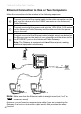
analog
phone
Advanced
Cable
Gateway
Connect a standard phone line
cord directly from the phone (fax
machine, answering machine, caller
ID box, etc.) to the TEL port on the
Advanced Cable Gateway.
To make a normal telephone call,
pick up the handset; listen for a dial
tone, then dial the desired number
using this new connection. For
services such as call waiting, use
the hook switch (or FLASH button)
to change calls.
to the Advanced Cable Gateway