
User's Manual



59
Handset
Using the Handset
Address Deleting
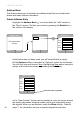
To remove a contact from the Address Book, use the navkey to
highlight the Address Book
icon from either the “Idle” screen or
the“Menu”screen.ConrmyourchoicebypressingtheSelect key in
the center of the navkey.
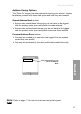
In the “Address Book” screen highlight the entry that needs the be
deleted using the navkeyandconrmyourchoicebypressingthe
Select key again.
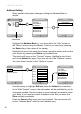
This action will take you to that person’s “Contact” screen. Press
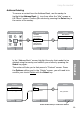
the Options softkey and, in the “Delete” screen, you will need to to
conrmyourchoiceDelete with the Select key.
Back
Address Book
Back
Address Book
Jim Alder
Ron Gibbons
Sue Mullins
Phil Newton
Doug O’Neil
Alice Rooney
Brenda Scott
Back Options
Contact
Phil Newton
Home: 333 333 3333
Email: pnew@aol.com
Back
Options
Edit
Delete
Copy To Phone
CancelOk
Delete
Are you sure. . .
Select the Ok softkey to conrm the deletion
Back Options
Contact
Phil Newton
Home: 333 333 3333
Email: pnew@aol.com