
User's Manual



52
Using the Handset
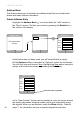
Highlight the message you want to view with the navkeyandconrm
by hitting the Select key in the middle of the navkey.
Therstscreenthatdisplayswhenyouconrmamessagewillbea
“Message Preview”.
To view the entire message, use the navkey to highlight the Get Full
Messagetextandconrm(press the Select key).
Back Options
8 Messages
Fr : Andy Jones
(andy@comcast.net)
Date : July 3 8:15p
Subject : Fireworks
Hey Betty, look outside
there is a terrific
fireworks display
happening right now
complete email
Hit arrow to scroll down for
the rest of message
Back
8 Messages
1. Bill Jones
2. Andy Jones
3. Liz@comcast.net
4. Helen@gmail.com
5. EasyBank@check.com
6. Mom@aol.com
7. Susan@mywork.net
Back
Message Preview
Date : July 3 8:15p
Subject : Fireworks
Hey Betty, look outside
there is a terrific
fireworks display
happening right now
...
Get Full Message
preview only
Press Select
to get the entire
message
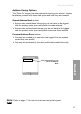
The Back softkey will return you to the previous screen.
Options for Emails
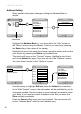
When you are within any e-mail message, pressing the Options softkey
willpresentaspeciclistofchoicesthatapplytothee-mailyouare
viewing. Here are the available options:
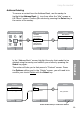
Delete - remove the current message from your queue.
No Yes
Message Delete
Message Deleted
Back Options
8 Messages
Fr : Andy Jones
(andy@comcast.net)
Date : July 3 8:15p
Subject : Fireworks
Hey Betty, look outside
there is a terrific
fireworks display
happening right now
Back
Message Options
Delete
Reply
Reply All
Forward
Highlight Delete by using the navkeyandconrmbyusingtheSelect
key in the middle of the navkey.