
User's Manual





61
Handset
Using the Handset
Calling Directly from Address Book
Calls can be dialed directly from the “Contact” screen in your address
book.
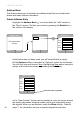
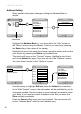
Highlight the Address Book icon by using the navkey in either the
“Menu” screen or the “Idle” screen.
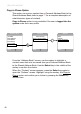
When the “Address Book” screen is displayed, use the navkey to
highlightthecontactnamethatistobedialed.Conrmyourpickby
pressing the Select key in the middle of the navkey.
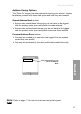
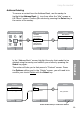
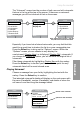
In the “Contact” screen use the navkey to highlight the number in the
contact’s listing that you wish to dial. Press the Talk (green) button and
the number is dialed.
Back
Contact
Doug O’Neil
Home: 444 444 4444
Mobile: 888 888 8888
Back
Address Book
Jim Alder
Ron Gibbons
Sue Mullins
Phil Newton
Doug O’Neil
Alice Rooney
Brenda Scott
Person you wish to call Number you want to call
Press the green Talk button
to make the call
Mute Flash
Contact
Doug O’Neil
Home: 444 444 4444
Mobil: 888 888 8888
Calling...
888 888 8888
Status of your call displays here