
User's Manual







32
Handset Registration
Auto-Registration
Handsets packed with Base unit are pre-registered
ready to use right out-of-the-box.
Accessory Handset (Purchased
Separately)
For accessory handsets (without Base unit), an
auto-registration mechanism is available so the
unregistered accessory handset can be automatically
registered without the need of entering a PIN code.
On the base:
1. Put the base into subscription mode, by pressing
and holding PAGE_KEY (for at least 8 seconds).
2. The Blue DECT Activity LED flashes. It is now
ready to be associated with a new handset. This
registration mode lasts 90 seconds after pressing
the button. Once the subscription is done, the base
LED flashing is switched off.
On the handset:
From idle mode:
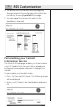
1. Press KEY_SOFT_1 labeled “Menu”
2. Navigate through the menu until “Registration” is
highlighted.
3. Press KEY_SOFT_1 labeled “OK”, “Register Handset”
is displayed.
4. Press KEY_SOFT_1 labeled “OK” (or press RIGHT_
arrow),
5. Confirmation message is displayed explaining that
the previous registration of this HS will be deleted
6. Press KEY_SOFT_1 labeled “OK” to validate and
start the handset registration. “Base search 1” is
displayed. If the handset has located the base, it
may display (depending on EEPROM settings), the
base identification number (RFPI).
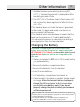
NOTE: When a handset is
associated with a base,
a number is given to the
handset by the base. This
number is displayed on the
handset after the name
and must be used for
internal calls.
NOTE: A handset can be
registered to only one
base.