
User's Manual



15
Programming Your Phone
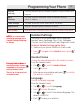
Melody
Settings
Set your preferences for volume, ringtones, ringer volume and
keypad.
Base
Settings
Set tone or pulse dial mode, revert to default settings,
verify IP address.
Time Settings
Set date and time, select time format, set alarm..
Registration
Register and de-register handsets to base.
RSS Setting
View and select channels, revert to default channels, help guide
Handset Settings
There are seven programmable menus available:
Handset Name, Language, Menu Color, Wallpaper,
Contrast, Auto Talk, and Area Codes (Regional & Local).
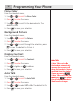
To Access Handset Settings via the Menu
1. Make sure your phone is OFF (not in talk mode).
2. Press , navigate to the Handset menu, press
to enter.
Handset Name
Change the name displayed on the handset’s screen.
From the Handset menu;
1. Use or to scroll to Handset Name.
2. Press to enter.
3. Enter name using number pad, press
to confirm.
The default is Handset #.
Language
Choose the display language.
From the Handset menu;
1. Use or to scroll to Language.
2. Press to enter the menu.
3. Use or to scroll to the desired language. The
default is ENGLISH.
4. Press to save your selection.
NOTE: If you cannot read
the display language, go to
Handset Settings/Language
to change.
NOTE: If you cannot read
the display language, go to
Handset Settings/Language
to change.
Entering Handset Name: It
may be necessary to press
repeatedly to clear any pre-
existing handset name.
There is an 8-character limit
to handset name
Entering Handset Name: It
may be necessary to press
repeatedly to clear any pre-
existing handset name.
There is an 8-character limit
to handset name