
User's Manual



14
Getting to Know Your Phone
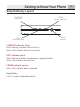
Standby Display
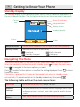
The standby display of your phone provides various status indicators and access to
the menu-based interface. The illustration below shows the screen and its elements.
Range Indicator
Flashes when handset is out of range of the base/gateway.
Battery Status
Indicates the status of the battery.
Low level. Fully charged.
Partially charged. Charging.
Navigating The Menu
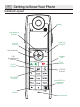
Your phone has an easy to use menu system. Each menu leads to a list of options.
When the handset is switched on and in standby, press to open the main menu.
Press to navigate to the menu options you want.
Press to select further options or confirm the setting displayed. Press to return
to previous menu.
If no button is pressed for 60 seconds, the handset will return to standby mode
automatically. To cancel and return to standby mode at any time press .
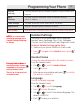
The following table outlines the main menu items:
Calls Lists
Received and dialed calls, delete call lists.
Handset
Settings
Set your preferences for handset name, language, menu color,
wallpaper picture, contrast, auto talk, regional and local area
codes.
Names
Add, edit or delete entries to your phonebook listings.
Battery status
Range indicator
Action
Action
Handset identity
Current
time
Alarm On indicator