
User's Manual




10
Installation
Power Supply Connection
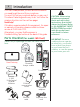
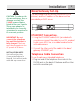
1. Connect the power adaptor provided with your unit
to the base/gateway as shown below.
2. Connect the adaptor to an electrical wall outlet.
3. When power is applied to the base/gateway,
the unit goes through a one minute initialization
process in the following sequence:
a) the blue DECT indicator is on (solid),
b) the green POWER indicator flashes,
c) both the blue DECT and green POWER
indicators flash
d) the green POWER and blue ETHERNET
indicators are on (solid).
The unit has now completed the process. The phone
will not function until this process is complete.
Handset Synchronization
1. After handsets are powered up, wait 2-3 minutes
until Synchro RSS appears on the handset display.
This indicates that the handset and base/gateway
are synchronized to each other. There are some
popular channels pre-configured to help get you
started.
2. Programmed content windows will start auto
scrolling and handset is ready for use.
Your handset will automatically Synchro RSS feeds
approximately every 15 minutes, during this automatic
process you will not be able to search/use RSS feeds.