
Quick Start Guide





8
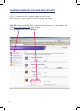
Step 15: Configure Wireless
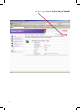
To enable WiFi, tick on Interface Enable.
To change SSID, enter the desired
name at “Network Name (SSID)”.
To enable WEP security, select:
“Use WEP Encryption”
WEP Key Length = 64 bit
WEP Encryption Key = xxxxxxx
To save changes,
click on Apply.
Note: WPA settings are also available.