
Operating instructions




• Impaq® 3000 Mk 2 Blu-ray
23
Repeat section
With this function you can mark a section for repetition.
Note: This function is not available on some Blu-rays.
1. Start playback.
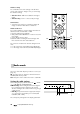
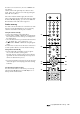
2. To start the desired section, briefl y push the button 53
“A–B”.
3. Briefl y push the button 53 “A–B” again at the end of
the desired section.
The section will now be continually repeated.
4. To continue normal playback, briefl y push the button
53 “A–B” again.
Jumping to track, chapter or placemark
Show a certain passage on the BD/DVD:
1. Select the desired function with the button 67 “Search”:
Push 1 x: Go to track
Push 2 x: Go to chapter
Push 3 x: Go to time
2. With the number buttons 33 “1...0”, type the track/
chapter number or the time in the input fi eld. The entry
behind the input fi eld is the number of tracks or chap-
ters or the total playing time.
3. Push the select button 44 “Enter”.
Picture in Picture (PIP)
Some Blu-ray discs offer the possibility of showing a
bonus video in addition to the main fi lm, e.g. with com-
ments from the author. Different camera angles can also
be selected.
1. Push the button 49 “PIP” to use these functions.
A menu with the additional functions available on the
BD appears.
2. Select the desired function with the navigation buttons
42 “▲” and 58 “▼” and confi rm wth the select button
44 “Enter”.
3. With the button 48 “Secondary Audio” you can switch
the sound between the main fi lm and bonus video.
Note: The sound of the bonus video will not be issued
in 5.1 multichannel sound.
4. To deactivate the function push the button 49 “PIP”
again.
58
67
42
44
53
49
48
33