
User Manual


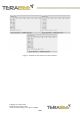



● When a person performs a Left to Right gesture, the sensor outputs a character
string “Right”
The default working range is from 0.2 m to 0.4 m, and can be adjusted from a minimum
of 0.1 m to a maximum of 0.5 m.
The user’s body should be more than 0.5 m away from the sensor, with their hand swiping
in the 0.1 m to 0.5 m range of the sensor, to avoid negatively affecting the sensor’s
behavior and to remain out of the sensor’s field of view.
Notes:
1. A minimum of 0.1 m is required between minimum and maximum working
ranges
2. For an optimal use, a minimum of 0.25 m is required for the maximum working
range of Swipe Mode and the minimum working range of Engagement Trigger
Mode.
5.1.4.2. Validation Mode
Through validation mode, the sensor detects a validation event when a person places
his/her hand below a set distance in front of the sensor for a set duration (a few
seconds). When a validation is acknowledged, the sensor outputs a character string
“Validation”.
The default working range is 0.15 m, and can be adjusted from a 0.01 m to 0.15 m.
Note: For optimal use, a minimum of 0.05 m is required between the validation working
range and the minimum working range of Swipe Mode.
5.2. Installation of Graphical User Interface Package
5.2.1. Linux and Raspberry Pi
Instructions:
● Open a terminal in the evo_swipe_plus folder (evo_swipe_plus-arm for Raspberry
Pi and other Armv7l)
● Type: Pip install -r requirements.txt
● Launch: main.py by typing: python3 main.py
5.2.2. Windows
Instructions:
● Double click on EvoSwipePlus_1.2 to launch executable and Install.
Copyright © Terabee 2020
Terabee, 90 Rue Henri Fabre
01630, St Genis-Pouilly, France (next to CERN)
19/29