
User Manual


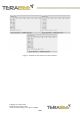



Click on LF, and in the line-end marker select the header of the operating mode for
easier data reading.
Figure 5 - HTerm parameters for TeraRanger Evo Swipe Plus
Once the USB port is selected and the parameters correctly set, click on the “Connect”
button.
The TeraRanger Evo Swipe Plus data will now appear in the “Received data” box
depending on the current working mode (see Figure 6).
Copyright © Terabee 2020
Terabee, 90 Rue Henri Fabre
01630, St Genis-Pouilly, France (next to CERN)
12/29