
User Manual





3.2. Connecting the TeraRanger Evo to a Host Computer
3.2.1. Windows OS
In Windows it is possible to use any terminal emulation software for data display.
Terabee works with and suggests using HTerm software. Please follow the provided link
to download the software file (http://www.der-hammer.info/terminal/), and select the
appropriate file for your platform.
Tested with version 0.8.4 on Linux x64 and Windows 10 x64 platforms.
When using Windows, extract the downloaded zip file to the selected folder,
openitanddouble click on the “HTerm.exe” file.
When using Linux, extract the downloaded tgz file to the selected folder, make sure that
you have execution permission for the file “hterm” (command: chmod u+x hterm),
double click on the “hterm” file or run it from terminal while in its directory: ./hterm.
On Linux, consider removing the modemmanager package if you are sure that it is
not required by your system setup. This will shorten the initialization time of serial
devices in the Linux system:
sudo apt purge modemmanager
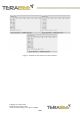
Connect the TeraRanger Evo Swipe Plus to a computer and select the corresponding
USB port (click “R” button to refresh the port list). Please configure the software with the
following parameters:
Baud rate : 115200 bit/s
Data bits : 8
Stop bit : 1
Parity bit : None
For easier data reading, select the “LF” option from the “Newline at” drop-down field.
See Figure 5 below for visual instructions.
Copyright © Terabee 2020
Terabee, 90 Rue Henri Fabre
01630, St Genis-Pouilly, France (next to CERN)
11/29