
Operation Manual




Camtasia Studio Version 8 Help
www.techsmith.com - 85 -
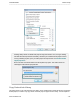
3. Select Add playhead selection to Library.
4. The sequence is added to the Library as an asset.
Click the asset in the Library to rename it.
Drag asset into a folder for better Library organization.
Drag asset to the timeline to include in the final video.
Add Timeline Media
To add media such as a video clip, audio clip, callout or group to the Library:
1. Click to select a clip on the timeline. When the clip is selected it is highlighted in blue.
2. Right-click the media on the timeline.
3. Select Add asset to Library.
4. The clip is added to the Library as an asset.
Click the asset in the Library to rename it.
Drag asset into a folder for better Library organization.
Drag asset to the timeline to include in the final video.
_________________________________________________________________________________________________________