
Operation Manual




Camtasia Studio Version 8 Help
www.techsmith.com - 76 -
Sort Media Assets in the Library
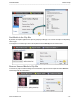
You can sort media assets in the Library by name, type or size. To change the sort criteria, right-click in the
Library and select Sort by from the context menu. Or, double-click a sort option at the top of the Library.
See also
Add Media to the Library
Manage Library Content
Create Library Asset from Timeline Selection or Timeline Media
Export Library Assets as a ZIP File (LIBZIP)
Import a Zipped Library File (LIBZIP)
_________________________________________________________________________________________________________