
Operation Manual




Camtasia Studio Version 8 Help
www.techsmith.com - 75 -
Library
The Library holds timeline sequences, video, audio, and image clips that you want to use from project to
project. Items in the Library are called media assets.
The Library comes pre-populated with royalty free media assets you use to add a professional to your
videos.
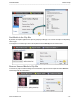
To add a media asset to the video, drag the asset from the Library onto the timeline or right-click on an
asset and select Add to Timeline.
View Media Properties in the Library
To view additional properties such as file name, location or size, right-click on a Library asset and select Prop-
erties from the context-menu.
_________________________________________________________________________________________________________