
Operation Manual




Camtasia Studio Version 8 Help
www.techsmith.com - 70 -
Clip Bin
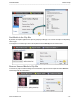
The Clip Bin references all video, audio, and image clips imported into the current project. You can add mul-
tiple instances of a clip onto the timeline.
A produced video only includes the clips and elements on the timeline.
To add a clip to the video, drag the clip from the Clip Bin onto the timeline or right-click on a clip and
select Add to Timeline.
Clips in the Clip Bin are not affected by any editing on the timeline. When you add a clip to the timeline,
you create a copy of the source clip. For example, if you split a clip on the timeline, the split is not
reflected in the original clip in the Clip Bin.
To import media, see Import Media into Clip Bin.
Moving or deleting original files (for example, on a hard drive or network) that have been
imported into the Clip Bin can break your Camtasia Studio projects. Before moving or deleting
_________________________________________________________________________________________________________