
Operation Manual




Camtasia Studio Version 8 Help
www.techsmith.com - 57 -
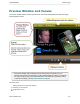
Press and hold the ALT key while dragging the clip for 3-D rotation.
To Select More than One Media
Click on the first media, press and hold Shift on the keyboard then click on the other media.
Selected media can be moved, rotated, and resized together.
Group Media
Click on the first media, press and hold Shift on the keyboard then click on the other media. Right-click
on one of the selections and choose Group from the menu.
To ungroup, right-click the group and choose Ungroup from the menu.
_________________________________________________________________________________________________________