
Operation Manual





Camtasia Studio Version 8 Help
www.techsmith.com - 46 -
Pixels to Inches Conversion
Pixels Inches Ratio
Width Height Width Height W:H
320 240 3.34 2.5 1.33
400 300 4.17 3.13 1.33
480 320 5 3.34 1.5
640 480 6.67 5 1.33
720 480 7.5 5 1.5
800 600 8.34 6.25 1.33
936 624 9.75 6.25 1.33
1008 672 10.5 7 1.5
1024 768 10.67 8 1.33
1080 720 11.25 7.5 1.5
1280 720 13.34 7.5 1.77
Record a PowerPoint Presentation Without the Add-In
After you save the PowerPoint slides as individual images, you can create the presentation in Camtasia Stu-
dio.
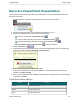
1. In Camtasia Studio, select Import Media.
2. Select the image files saved from the PowerPoint presentation and click Open.
3. The images of the slides import into the Clip Bin. Drag the images onto the Timeline in the desired
sequence.
4. The Project Settings dialog box appears. Enter the dimensions into the Width and Height fields and
click OK.
5. In the Task List, select Voice narration.
6. Begin recording voice narration. Click the Extend Current Frame button to extend the slide’s duration
to match the voice narration.
7. Click Finished.
_________________________________________________________________________________________________________