
Operation Manual



Camtasia Studio Version 8 Help
www.techsmith.com - 281 -
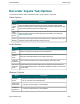
Recorder Program Tab Options
To access these options, select Camtasia Recorder >Tools > Options > Program tab.
Recording Region Options
Option Descriptions
Region appearance
Choose how to display the green recording rec-
tangle during recording. Options include: Corn-
ers, Rectangle, and Hidden.
Glowing capture rectangle
Flashes the green recording area during record-
ing.
Force popup dialog boxes into region
Opens dialog boxes and other popup windows
into the recording area.
Force region to multiple of 4 (improves quality)
Forces the dimensions of the video (in pixels)
to a multiple of four. This eliminates errors
when viewing videos created with certain
codecs (such as Microsoft Video 1) which
requires frames in multiples of four pixels.
Workflow Options
Option Description
Record screen after
starting capture
Show countdown before recording
Uncheck the Show countdown before recording option to have record-
ing begin immediately when the Record hotkey or button is pressed.
Restore cursor loca-
tion after pause
Restores the cursor to the position on the screen prior to the pause. This
allows you to seamlessly continue the action in the recording prior to the
pause.
You must press F9 to pause and resume the recording to use this option.
Hide Preview Win-
dow after recording
is stopped
Select this option to not preview your screencast after recording. Choose
from the following post recording options: Save, Produce, Add to Time-
line, Add to Clip bin.
_________________________________________________________________________________________________________