
Operation Manual



Camtasia Studio Version 8 Help
www.techsmith.com - 279 -
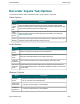
Recorder Inputs Tab Options
To access these options, select Camtasia Recorder > Tools > Options > Inputs tab.
Video Options
Option Description
Screen
capture
frame
rate
Select the capture frame rate in frames per second. Larger frame rates usually
produce smoother videos. However, larger frame rates produce larger file sizes and
require more system resources to record the video.
Video
settings
button
Opens the Video Compression Setup dialog box which allows you to select the
screen capture codec.
Restore
defaults
Restores the video capture settings to the default values: capture frame rate (30 fps)
and video codec (TechSmith Screen Capture Codec 2).
Audio Options
Option Description
Audio
device
Select a microphone or audio device from the dropdown.
Volume
slider
Drag the volume slide to adjust the recording volume level.
Audio set-
tings button
Click to select the audio format for the recording file. See Audio Format.
Record sys-
tem audio
option
System audio is the system sounds from your computer such as mouse click
sounds and audio playing from your speaker. Disable this option to not record the
system audio.
WebcamOptions
Option Description
Webcam
device
Select the camera device from the dropdown. If the device is on and properly
set up, a preview of the camera appears.
Device prop-
erties button
Consult your camera device’s documentation.
Format set-
tings button
Consult your camera device’s documentation.
_________________________________________________________________________________________________________