
Operation Manual





Camtasia Studio Version 8 Help
www.techsmith.com - 147 -
Adjust the Timing of the Zoom Animation
The timing of the zoom animation determines how long it takes to zoom in, zoom out, or pan.
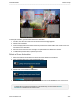
1. Select the media on the timeline that contains the zoom animation to be adjusted.
2. Click on the animation icon to open the animation view.
3. Double-click on the animation.
4. Drag the beginning of the animation in either direction to change the duration.
You can also adjust this animation using the options found in the Visual Properties tab.
_________________________________________________________________________________________________________