
Operation Manual





Camtasia Studio Version 8 Help
www.techsmith.com - 146 -
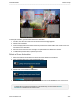
To add a pan animation, you first need to add a zoom animation.
1. In Editor, click the Zoom-n-Pan tab. The Zoom and Pan task page appears.
2. Add the zoom animation.
3. Position the playhead on the timeline where the pan animation will be added. This needs to be a loca-
tion after the zoom animation.
4. Move but do not resize the zoom rectangle. The pan animation is added to the timeline.
5. To add another pan animation, repeat steps 3 and 4.
Delete a Zoom Animation
1. Select the media on the timeline that contains the zoom animation to be deleted.
2. Click on the animation icon to open the animation view.
3. Double-click on the animation to be deleted.
4. Press Delete on the keyboard or right-click the animation and select Delete from the context menu.
To delete all zoom and visual animations on the media clips, choose Delete all visual
animations on media from the context menu.
_________________________________________________________________________________________________________