
Operation Manual



Camtasia Studio Version 8 Help
www.techsmith.com - 118 -
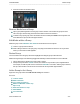
Groups with horizontally placed media open with the group header expanded across the track above it.
This will temporarily block access to media that may be on that track.
Ungroup Media
Right-click on a group and choose Ungroup from the menu.
Media from the group will retain its original position on the timeline.
If there is other media on the timeline, the ungrouped media may be placed on new tracks.
Add Media to a Group
1. Drag the media over top of the group and hover until the group header turns white with a dashed line
around it.
2. Remain hovering until the group opens and the media appears in the group.
_________________________________________________________________________________________________________