User's Manual
Manuals
Brands
Technology Solutions Manuals
Electronics
Multi ISO RFID Reader
1
2
3
4
5
6
7
8
9
10
Table Of Contents
Introduction
Parts of the RFID 1059
Attachingto an MC70
Detaching from an MC70
Using the RFID 1059
Basic operation
Software support for the RFID 1059
Low level command set
API
Power management with the RFID 1059
Fitting a SAM
Compatible peripherals
ActiveSync
Troubleshooting and Maintenance
Maintenance
Troubleshooting
Technical specifications
Summary of specifications
Pin-outs
Regulatory Information
Statement of compliance
Health and Safety Recommendations
Waste Electrical and Electronic Equipment (WEEE)
Warranty
Multi IS
O RFID
1059 Use
r Guide.doc
1059
Page 6 of 22
4
Detac
hing from an MC
70
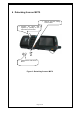
Figure 3: De
tachin
g from an MC70
1.
Remove
th
e
latch
lockin
g
screws
if fitted.
2.
Squ
eeze
the
spring
clips
togeth
er
by
pressing
on
t
h
e
latch l
ocki
n
g screw h
oles.
3.
Sli
de the RFID 1
059 off
the
MC70.
1
...
...
4
5
6
7
8
...
...
22