
User's Manual




8
1 GETTING START
ED
DMS-CTC-20101206-0033 v0.1
1.3.2 Local Network Connection
Overview
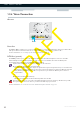
Wireless Access Point
The built-in WiFi-certified wireless access point provides wireless access to your WiFi-certified wireless clients.
For more information, see “5 The Technicolor Gateway Wireless Access Point” on page 41.
Ethernet switch
The Ethernet switch () allows you to connect an Ethernet device (for example, a computer) to your local network. For
more information, see “3.3.2 Setting up a Wired Connection” on page 28.
A LED may be provided per Ethernet port to indicate link integrity (or activity).
USB Port
The USB port () can be used to:
Connect a USB mass storage device to share your content (for example, music, movies,...):
On your local network via the Network File server or the UPnP AV Media Server.
On Internet via FTP.
For more information, see “8 Sharing Content on your Technicolor Gateway” on page 65.
LED Status Description
Solid on Device connected.
Blinking Device connected and sending/receiving data.
Off No device connected.