
User Manual




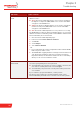


Table Of Contents
- About this Installation and Setup Guide
- 1 Introducing the Thomson Gateway
- 2 Basic Installation
- Before you begin
- ADSL service
- Computer requirements
- Wireless client adapters
- Internet connection details
- 2.1 Mounting your Thomson Gateway
- 2.2 Installing your Thomson Gateway
- 2.3 The Setup CD
- 2.4 Thomson Gateway Connection Essentials
- 2.5 Connections Overview and Powering
- 2.6 Basic Security
- 3 Web-Based User Interface
- 4 Troubleshooting

E-DOC-CTC-20060911-0041- v1.0
Chapter 4
Troubleshooting
34
No Ethernet activity.
If you are connected through a protocol other than PPPoE, this
check is not applicable as the result will always be ‘No Ethernet
activity’.
> Authentication failed: check your user name and password.
The user name is in most cases in the form of
username@ISP.
> Your connection is disconnected.
> Could not bring up link.
No IP No IP address or no DNS server has been configured. During IP
address negotiation, there was an IPCP error or a DHCP error.
No Internet This test sends 1 ping to each address of a configured list of IP
addresses. The test succeeds if all addresses can be reached. If
your primary and secondary DNS server are part of the list,
reaching one of both is enough.
No DNS The DNS service provided by your ISP may have a problem.
Test result Explanation